Fast Retail Checkout with Mixed Payment
Retail checkout looks simple: scan products, apply discounts, take payment, and print the receipt. But in real retail operations, checkout can become complicated very quickly. A single sale may include pricing rules, discounts, vouchers, partial voucher balances, cash, card,…
هذا المقال متاح بالإنجليزية فقط.
Retail checkout looks simple: scan products, apply discounts, take payment, and print the receipt. But in real retail operations, checkout can become complicated very quickly.
A single sale may include pricing rules, discounts, vouchers, partial voucher balances, cash, card, or mobile wallet payments. If the POS does not control this flow properly, cashier errors can happen easily, especially when a voucher does not cover the full order value.
The Fast Retail Checkout with Mixed Payment use case shows how a modern POS system helps cashiers complete sales quickly while protecting the business from pricing and payment mistakes.
The Business Problem
Many retail businesses use vouchers, gift cards, loyalty credit, or store credit to increase customer loyalty and repeat purchases.
The challenge appears at checkout.
A customer may have a voucher, but the voucher balance may be lower than the final order total. In this case, the cashier must apply the voucher correctly and collect the remaining amount using another payment method.
Without a controlled POS workflow, the cashier may:
- Accept an invalid or expired voucher
- Apply more voucher balance than allowed
- Forget to collect the remaining amount
- Complete the sale before full payment
- Record the payment breakdown incorrectly
These mistakes directly affect revenue, reporting, and customer trust.
Use Case Overview
In this use case, the cashier processes a retail order using more than one payment method.
The POS flow includes:
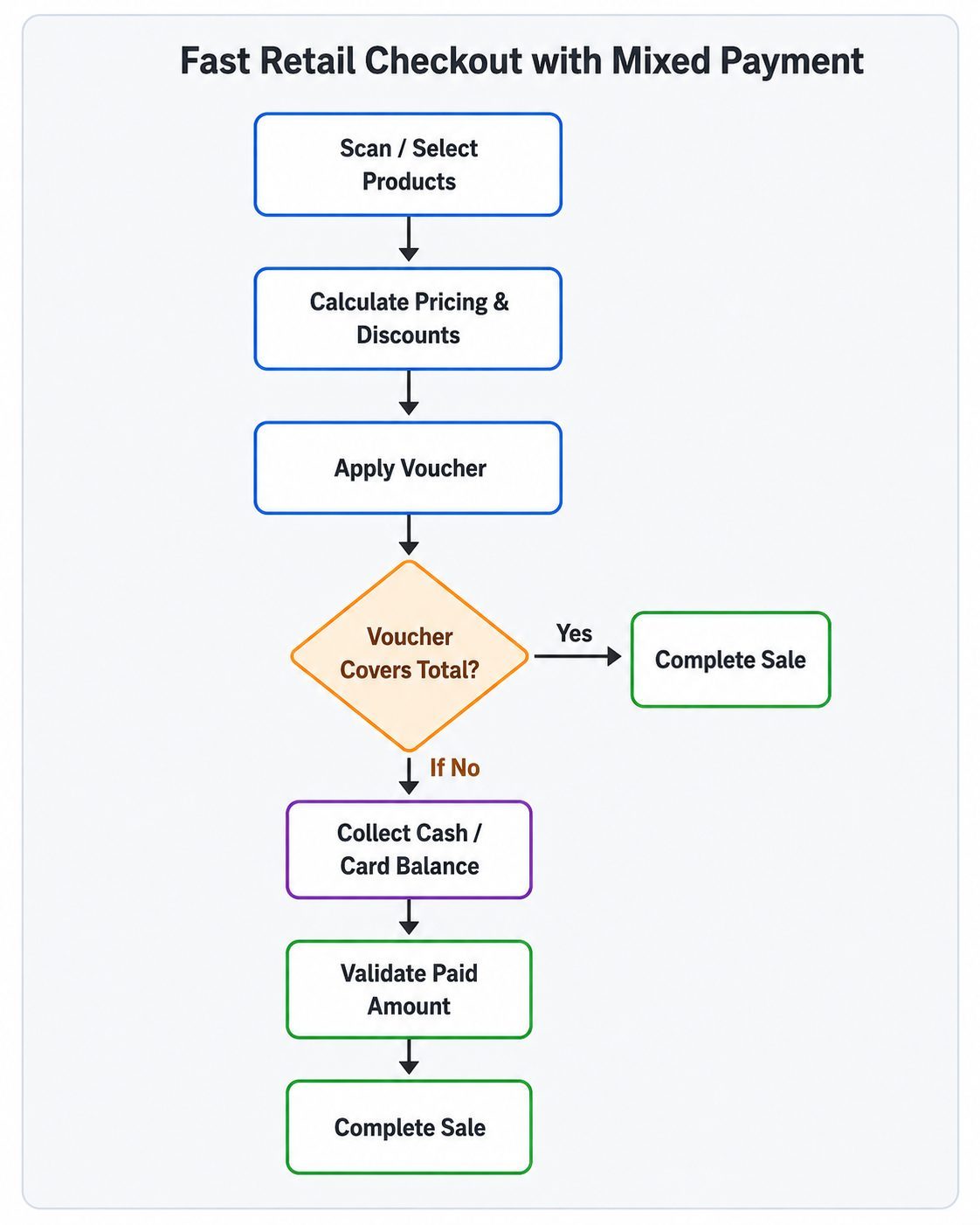
- Adding products to the cart.
- Applying pricing rules and discounts.
- Validating the customer voucher.
- Applying the available voucher balance.
- Calculating the remaining amount due.
- Collecting the rest by cash, card, or another method.
- Validating that the full amount has been paid.
- Completing the sale and issuing the receipt.
This proves that the POS is not only a billing screen. It is a controlled checkout system that connects pricing, promotions, vouchers, and payment validation in one process.
Example Scenario
A customer buys products with a final total of 1,250 EGP after discounts.
The customer has a voucher with 1,000 EGP available balance.
The POS applies the voucher amount and automatically shows that 250 EGP is still unpaid.
The customer pays the remaining 250 EGP by card.
| Description | Amount |
|---|---|
| Final order total | 1,250 EGP |
| Voucher used | 1,000 EGP |
| Card payment | 250 EGP |
| Remaining balance | 0 EGP |
The cashier does not need to calculate the split manually. The POS guides the transaction and only allows completion when the full order value is paid.
How the Checkout Flow Works
1. Products Are Added to the Cart
The cashier scans product barcodes or searches for items manually. The POS retrieves product details, prices, taxes, stock availability, and any eligible promotions.
The cart total updates instantly as items are added or quantities change.
2. Discounts and Pricing Rules Are Applied
The POS checks active pricing rules and applies the correct discounts automatically.
These may include seasonal offers, category discounts, customer group pricing, campaign promotions, or manual discounts within approved cashier limits.
This reduces manual work and keeps pricing consistent across cashiers and branches.
3. Voucher Is Validated
When the customer provides a voucher, the cashier scans or enters the voucher code.
The POS checks whether the voucher is active, valid, not expired, not fully used, eligible for the branch or customer, and has remaining balance.
Invalid vouchers are rejected before they affect the sale.
4. Voucher Balance Is Applied
If the voucher is valid, the POS applies the available balance to the order.
If the voucher covers the full total, the order can be marked as fully paid. If not, the system calculates the remaining amount automatically.
Example:
| Description | Amount |
|---|---|
| Order total | 1,250 EGP |
| Voucher applied | -1,000 EGP |
| Remaining due | 250 EGP |
5. Remaining Amount Is Paid
The customer pays the remaining amount using another method such as cash, card, mobile wallet, or another approved payment method.
Each payment method is recorded separately for clear reporting and reconciliation.
6. POS Validates Full Payment
Before completing the sale, the POS verifies that the total paid amount equals the final order total.
If any amount is still unpaid, the system blocks completion.
This prevents the cashier from closing a transaction before the full payment is collected.
7. Sale Is Completed
Once payment is fully validated, the POS completes the transaction.
The system records the sale, deducts stock, updates the voucher balance, saves the payment breakdown, and issues a receipt.
The receipt clearly shows the subtotal, discounts, final total, voucher amount, second payment method, and remaining balance.
Why This Use Case Has High Marketing Value
This use case is commercially strong because it solves a real retail problem.
Many businesses lose money or face customer disputes because vouchers and split payments are handled manually or inconsistently.
A POS system that supports mixed payment gives the business:
- Faster cashier checkout
- Fewer payment mistakes
- Better voucher control
- Automatic remaining balance calculation
- Accurate payment reporting
- Easier end-of-day reconciliation
- Better customer experience
It shows that the POS is not just an invoicing tool. It is a business control system.
Benefits for Retail Owners
Retail owners need speed and accuracy at the same time.
This use case helps them protect revenue by making sure every sale is fully paid before it is completed. It also gives managers better visibility into how much was paid by cash, card, voucher, or other methods.
This makes daily reconciliation easier and helps finance teams track voucher usage correctly.
Benefits for Cashiers
Cashiers do not need to manually calculate voucher coverage or remaining balances.
The POS clearly displays:
- Final payable amount
- Voucher amount applied
- Remaining amount due
- Payment methods used
- Payment completion status
This makes checkout easier, reduces training time, and lowers cashier stress during busy hours.
Benefits for Customers
Customers get a smoother checkout experience.
They can use a voucher even if it does not cover the full order value, then pay the rest using another payment method. The receipt clearly shows how the payment was split, which reduces confusion and disputes.
Common Errors Prevented
A controlled mixed payment checkout helps prevent:
- Completing a sale with partial payment
- Accepting expired or invalid vouchers
- Overusing voucher balance
- Forgetting to collect the remaining amount
- Applying discounts incorrectly
- Losing the payment breakdown in reports
Conclusion
Fast Retail Checkout with Mixed Payment is an important POS use case for any retail business that uses vouchers, gift cards, loyalty credit, or store credit.
It helps cashiers move faster, protects the business from payment errors, and gives customers a flexible and transparent checkout experience.
A modern POS should do more than create invoices. It should control pricing rules, discounts, vouchers, partial payments, and payment validation from one clear checkout flow.